API Access
The Static Maps API generates PNG image maps including markers, shapes, and labels.
Base Service URLs:
- Supported methods: GET or POST
- Response formats: JSON / XML
You can get a static map using an image path or directly as a bit array.
The maximum image size is &width=1680&height=1280 (in pixels).
Paint Markers in the Map
Request Parameters
Example:
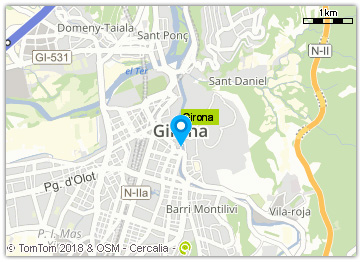
https://lb.cercalia.com/services/v2/json?cmd=map&ctn=girona&ctryc=ESP&key=YOUR_API_KEY
| Parameter | Description |
|---|---|
cmd | Map (fixed parameter - request type = static map) |
width & height | Image size (in pixels) |
mocs | gdd coordinate system (gdd = geographical lat,long). Optional |
extent | Y,X upper left | Y,X lower right. Optional |
molist | List of markers. Format: `[Y,X |
Icons: The icon is specified by an integer numeric code (1, 2, 3…). These icons must be published on the Cercalia platform servers.
Optional:
| Parameter | Description |
|---|---|
img | Returns the image, instead of a JSON/XML response |
Response Structure
If request includes &img= parameter, the response is the image (array of bits).
Otherwise, the response is in JSON/XML format, including the path for downloading the image:
{
    "cercalia": {
        "@cmd": "map",
        "@version": "1",
        "proximity": {
            "@center": "2.82360257,41.98164077",
            "@num": "1",
            "@op": "3"
        },
        "map": {
            "@cmode": "rf",
            "@smap": "0",
            "@style": "default",
            "img": {
                "@center": "2.82360257,41.98164077",
                "@format": "gif",
                "@height": "250",
                "@href": "/MapesNG/Cercalia/map/map48/90110337341.gif",
                "@scale": "4",
                "@width": "350",
                "extent": {
                    "coord": [
                        {
                            "@x": "2.79240408",
                            "@y": "41.99826097"
                        },
                        {
                            "@x": "2.85479207",
                            "@y": "41.96501619"
                        }
                    ]
                }
            },
            "label": {
                "@op": "1",
                "@pt": "2.82360257,41.98164077",
                "value": "Girona"
            },
            "poicats": {},
            "shapes": {}
        },
        "server": {
            "value": "lb.dev.cercalia.com"
        },
        "instance": {
            "value": "http://master-cercalia-lbs-both-lines"
        }
    }
}
Response Parameters:
| Parameter | Description |
|---|---|
href | Image path (e.g., /MapesNG/Cercalia/map/map0/45891615731.gif) |
| Server | https://lb.cercalia.com |
| Path including server + image | https://lb.cercalia.com/MapesNG/Cercalia/map/map0/45891615731.gif |
Map example:
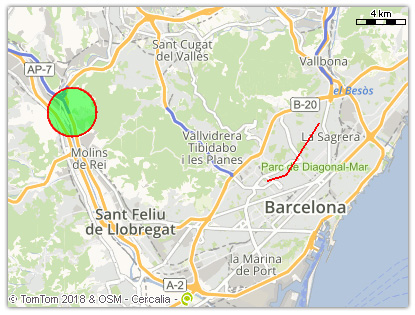
Paint Polylines, Areas, and Labels
Request Parameters
Example:
https://lb.cercalia.com/services/v2/json?cmd=map&width=400&height=300&labelop=0&mocs=gdd&cs=gdd&extent=41.439132726,2.003108336|41.390497829,2.197135455&shape=[255,0,0,128|2|0,255,0,128|CIRCLE|41.439132726,2.003108336|2000],[255,0,0|2|255,0,0|POLYLINE|41.401902461,2.142455003|41.404628181,2.155965665|41.433339308,2.179860852]&key=YOUR_API_KEY
The &shape= parameter includes several types of shapes: circle, rectangle, sector, line, polyline, label.
Shape format:
[outline color | outline size | fill color | shape type | specific parameters]
| Parameter | Description |
|---|---|
outline color | RGBA* format |
outline size | In pixels |
fill color | RGBA* format |
shape type | Shape |
specific parameters | Specific parameters according to shape type |
RGBA format (red, green, blue, alpha):
| Parameter | Description |
|---|---|
Red | Value between 0-255 |
Green | Value between 0-255 |
Blue | Value between 0-255 |
Alpha | Transparency (value between 0 = transparent, 255 = opaque). Default: 255 |
Response Structure
{
    "cercalia": {
        "@cmd": "map",
        "@version": "1",
        "proximity": {
            "@op": "3"
        },
        "map": {
            "@smap": "0",
            "@style": "default",
            "img": {
                "@center": "2.1001174,41.41481986",
                "@format": "gif",
                "@height": "300",
                "@href": "/MapesNG/Cercalia/map/map0/90110694631.gif",
                "@scale": "6",
                "@width": "400",
                "extent": {
                    "coord": [
                        {
                            "@x": "1.95750985",
                            "@y": "41.49528225"
                        },
                        {
                            "@x": "2.24272496",
                            "@y": "41.33425693"
                        }
                    ]
                }
            },
            "label": {
                "@op": "0",
                "@pt": "2.1001174,41.41481986"
            },
            "poicats": {},
            "shapes": {
                "shape": [
                    {
                        "@type": "CIRCLE",
                        "outline": {
                            "@color": "255,0,0,128",
                            "@width": "2"
                        },
                        "fill": {
                            "@color": "0,255,0,128"
                        },
                        "params": {
                            "coord": {
                                "@x": "2.00310834",
                                "@y": "41.43913273"
                            },
                            "rad": {
                                "value": "2000.0"
                            }
                        }
                    },
                    {
                        "@type": "POLYLINE",
                        "outline": {
                            "@color": "255,0,0,255",
                            "@width": "2"
                        },
                        "params": {
                            "coord": [
                                {
                                    "@x": "2.142455",
                                    "@y": "41.40190246"
                                },
                                {
                                    "@x": "2.15596567",
                                    "@y": "41.40462818"
                                },
                                {
                                    "@x": "2.17986085",
                                    "@y": "41.43333931"
                                }
                            ]
                        }
                    }
                ]
            }
        },
        "server": {
            "value": "lb.dev.cercalia.com"
        },
        "instance": {
            "value": "http://master-cercalia-lbs-both-lines"
        }
    }
}
Example:
https://lb.cercalia.com/services/v2/json?cmd=map&ctn=Girona&shape=[255,0,0|3|0,255,0,128|RECTANGLE|316502,5132529|314502,5130528],[255,0,0,128|10|0,255,0,128|CIRCLE|314502,5130528|1000]&key=YOUR_API_KEY
Shape Types and Specific Parameters
CIRCLE
Draw a circle. Specific parameters:
| Parameter | Description |
|---|---|
center | Y,X coordinate |
radius | Radius, in meters |
RECTANGLE
Draw a rectangle. Specific parameters:
upper left coordinates | lower right coordinates
SECTOR
Draw a sector. Specific parameters:
center | internal radius | external radius | start angle | end angle
| Parameter | Description |
|---|---|
center | Y,X coordinate |
internal radius | Radius, in meters, where the sector starts |
external radius | Radius, in meters, where the sector ends |
start angle | Angle, in degrees, where the sector begins |
end angle | Angle, in degrees, where the sector ends |
LINE
Draw a line. Fill color not available. Specific parameters:
start coordinate | end coordinate
POLYLINE
Draw a polyline. Fill color not available. Specific parameters:
coordinate 1 | coordinate 2 | ... | coordinate n
LABEL
Draw a label starting in a coordinate. Specific parameters:
center | text
| Parameter | Description |
|---|---|
center | Coordinates, text starting point |
text | Label content |
Example: