Cercalia SDKs & Libraries
Official SDKs and libraries for Cercalia APIs across server-side, client-side, and mapping stacks.
Cercalia SDKs are curated toolkits designed to simplify and accelerate the integration of our geocoding, routing, mapping, and spatial analysis services into your applications. They deliver production-ready defaults, consistent patterns, and reference documentation so you can ship location-based features with confidence.
Whether you are developing a mobile app, a web frontend, or a backend service, our SDKs provide:
- Faster Time-to-Market: Reduce development cycles with ready-to-use libraries and comprehensive documentation.
- Reliability: Benefit from thoroughly tested code maintained by the Cercalia team.
- Consistency: Ensure uniform integration patterns across platforms and projects.
- Support & Updates: Receive regular improvements, security patches, and dedicated support.
Explore SDK Categories
- Server-Side SDKs: TypeScript, Java, Python, and Go clients for backend services. See Server-Side SDKs.
- Client-Side SDKs: JavaScript Maps SDK plus native Android and iOS tooling. See Client-Side SDKs.
Choose the SDK that best fits your technology stack and start leveraging the full power of Cercalia’s mapping, routing, and geospatial intelligence with minimal effort.
1 - Client-Side SDKs
SDKs for building advanced web mapping applications with JavaScript, as well as native mobile apps for Android and iOS.
Build interactive maps and location-aware applications for end-users on mobile and web platforms. Our client-side SDKs provide high-performance rendering and seamless integration with modern development workflows.
Cercalia’s client-side SDKs are designed to help you deliver rich, geospatial experiences directly to your users. Whether you are building a modern web dashboard or a high-performance native mobile app, our libraries provide the tools needed to visualize data, calculate routes, and manage geographic information with ease.
Select the environment you are developing for to explore specific integration guides and API references.
Web Maps (JavaScript)
Interactive mapping applications with WebGL support via our GL API or robust OGC standard support with API v5.
Learn more →
Android SDK
Native performance for Android devices with integrated geocoding and offline map support.
Learn more →
iOS SDK
Optimized for the Apple ecosystem, providing fluid map interactions and native geolocation features.
Learn more →Key Capabilities
Regardless of the platform, Cercalia’s client-side libraries offer a consistent set of powerful features:
- Interactive Maps: High-performance rendering for smooth zooming, rotation, and tilting.
- Dynamic Layering: Overlay your own business data (GeoJSON, WMS, etc.) on top of our high-quality base maps.
- Search & Discovery: Integrated geocoding and POI search for finding addresses and points of interest.
- Routing & Directions: Request and display routes with turn-by-turn information directly on the map.
- Framework Friendly: First-class support and examples for React, Vue, Angular, and Next.js.
Getting Support
Need help choosing the right SDK for your project? Check our Getting Started guide or contact our technical team for personalized advice.
1.1 - Cercalia Maps API Javascript
Build high-performance, interactive mapping experiences for the web using Cercalia’s JavaScript SDKs.
Welcome to the documentation for the Cercalia Maps Javascript API. Whether you are building a modern dashboard with vector tiles or a classic mapping interface, our SDKs provide the tools to create rich geospatial experiences.
Why Cercalia for Frontend?
Cercalia’s client-side SDKs are designed with a focus on performance, interactivity, and ease of integration. We provide developers with two powerful paths depending on project requirements:
- High Performance: Vector-based rendering for smooth zooming and rotation.
- Broad Compatibility: Robust, layer-based mapping for legacy support and standard GIS workflows.
- Modern Ecosystem: First-class support for React, Vue, Angular, and Next.js.
API Flavors
Choose the version that best fits your technical stack and visual goals:
Cercalia Maps API GL (Recommended)
The modern standard for web mapping. Built on top of MapLibre GL JS, it uses WebGL to render vector tiles on the client side. This allows for:
- Dynamic Styling: Change map styles on the fly without reloading data.
- 3D Capabilities: Render buildings, terrain, and tilted views with high FPS.
- Smooth Interaction: Fluid animations and non-integer zoom levels.
Cercalia Maps API v5
Our battle-tested library based on OpenLayers. It is the ideal choice for applications that require extensive support for various OGC standards (WMS, WMTS) or need to maintain compatibility with older browser environments.
- Layer Management: Deep control over raster and vector layers.
- GIS Integration: Native support for complex geospatial formats.
View API v5 Documentation
Frontend Framework Integration
Modern web development demands more than just a <script> tag. We provide official examples and patterns to integrate Cercalia seamlessly into your framework of choice.
Why use a Framework Wrapper?
Integrating a map library into a reactive framework like React or Vue can be tricky due to how they manage the DOM. Our examples show you how to:
- Handle the lifecycle of the map object correctly (initialization and cleanup).
- Synchronize state between your application and the map (e.g., updating markers when data changes).
- Maintain type safety using TypeScript.

Vanilla JavaScript
The quickest way to start. Learn the core patterns without framework overhead.

React
Custom hooks and component patterns for the React ecosystem.

Vue
Composition API examples for reactive map state management.

Angular
Service-based architecture for enterprise-scale mapping apps.

Next.js
Server-side rendering (SSR) and hydration strategies for maps.
Browse all code samples at the
Official Examples Repository
.
1.2 - Cercalia Android SDK
Comprehensive documentation for integrating Cercalia’s Android SDK into your applications.
Welcome to the Cercalia Android SDK documentation. Here, you’ll find all the necessary information to seamlessly integrate maps and location-based services into your Android applications.
Overview
The Cercalia Android SDK is a client API designed to empower your Android applications with advanced mapping and geolocation capabilities. With this SDK, you can:
- Embed Interactive Maps: Effortlessly integrate dynamic maps into your app, enhancing user engagement and spatial awareness.
- Implement Geocoding: Provide users with autocompleted address suggestions as they type, streamlining the search experience.
- Utilize Reverse Geocoding: Determine the nearest address based on geographic coordinates, enabling features like location tagging and address retrieval.
Features
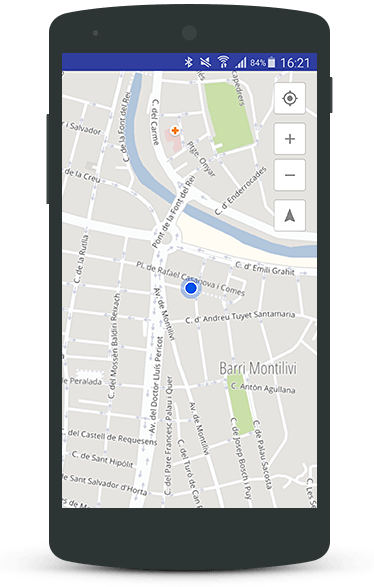
Embed Maps in Your App
Integrate interactive and customizable maps into your application with ease, offering users a rich and engaging experience.
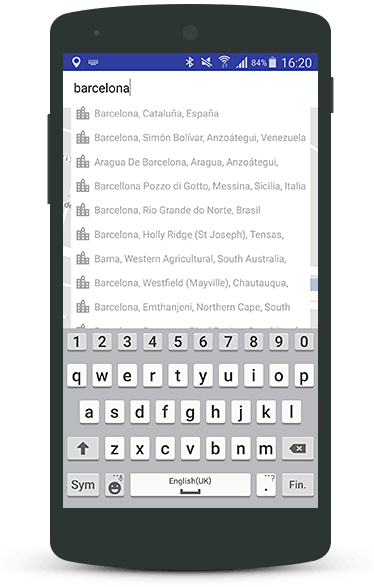
Geocoding
Enable real-time, autocompleted address suggestions to assist users in quickly finding desired locations.
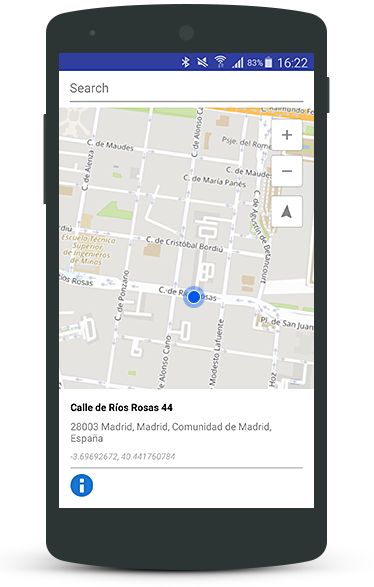
Reverse Geocoding
Retrieve the closest address corresponding to specific geographic coordinates, facilitating functionalities such as location-based searches and tagging.
Getting Started
To begin integrating the Cercalia Android SDK into your project:
- Request the SDK: Contact us to obtain the SDK package and your unique API key.
- Review the Documentation: Access detailed guides and references to understand the SDK’s capabilities and implementation steps.
- Integrate into Your Project: Follow the provided instructions to add the SDK to your Android application and configure it according to your needs.
For further assistance, refer to our comprehensive documentation or reach out to our support team.
Note: Ensure you have a valid API key to authenticate your requests and access Cercalia’s services.
1.3 - Cercalia iOS SDK
Comprehensive documentation for integrating Cercalia’s iOS SDK into your applications.
Welcome to the Cercalia iOS SDK documentation. Here, you’ll find all the necessary information to seamlessly integrate maps and location-based services into your iOS applications.
Overview
The Cercalia iOS SDK is a client API designed to empower your iOS applications with advanced mapping and geolocation capabilities. With this SDK, you can:
- Embed Interactive Maps: Effortlessly integrate dynamic maps into your app, enhancing user engagement and spatial awareness.
- Implement Geocoding: Provide users with autocompleted address suggestions as they type, streamlining the search experience.
- Utilize Reverse Geocoding: Determine the nearest address based on geographic coordinates, enabling features like location tagging and address retrieval.
Features
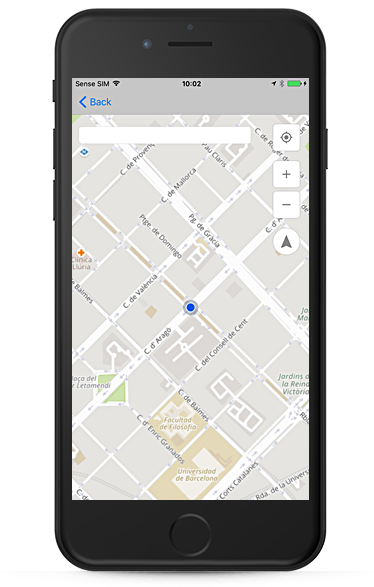
Include maps in your App
An easy way to integrate maps in any iOS Application.
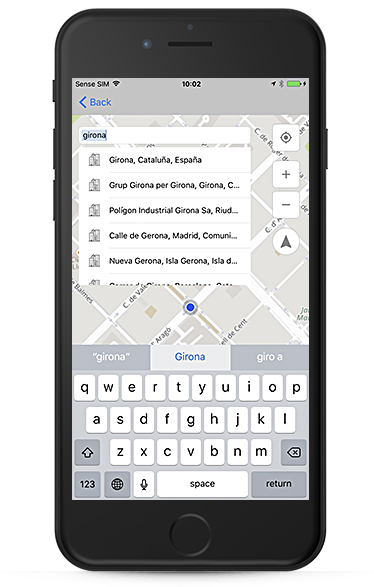
Geocoding
Suggestions of autocompleted addresses for partial character string entries.
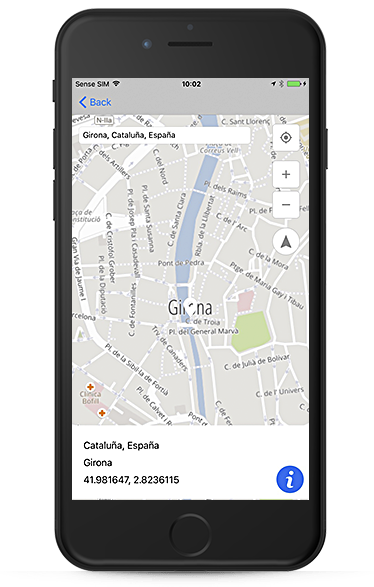
Reverse Geocoding
Find the nearest address based on a geographic location.
Getting Started
To begin integrating the Cercalia iOS SDK into your project:
- Request the SDK: Contact us to obtain the SDK package and your unique API key.
- Review the Documentation: Access detailed guides and references to understand the SDK’s capabilities and implementation steps.
- Integrate into Your Project: Follow the provided instructions to add the SDK to your iOS application and configure it according to your needs.
For further assistance, refer to our comprehensive iOS API documentation or reach out to our support team.
Note: Ensure you have a valid API key to authenticate your requests and access Cercalia’s services.
2 - Server-Side SDKs for Cercalia
Official Cercalia SDKs for TypeScript, Java, Python, and Go. Build secure, scalable backend integrations with type-safe clients, reference docs, and source code links.
Build backend services faster with Cercalia’s official server-side SDKs. Each SDK ships with type-safe APIs, production-ready defaults, and direct links to the reference docs and source code.
SDK Overview

TypeScript SDK
Type-safe client for Node.js and browser runtimes with first-class TypeScript support.

Java SDK
Enterprise-ready Java client with sync/async APIs for production workloads.

Python SDK
Typed Python client with Pydantic models, ideal for data and backend services.

Go SDK
Idiomatic Go client optimized for high-throughput service integrations.
2.1 - TypeScript SDK for Cercalia
Type-safe TypeScript/JavaScript SDK for Cercalia APIs with Node.js and browser support, plus reference docs and source code links.
Cercalia SDK for TypeScript
A modern, type-safe TypeScript SDK for Cercalia web services. Build powerful location-based applications with geocoding, routing, POI search, and more—all with full TypeScript support for both Node.js and browser environments.
Reference: https://docs.cercalia.com/docs/sdks/reference/typescript/
Source code: https://github.com/Cercalia/cercalia-sdk-ts
import { GeocodingService, RoutingService } from 'cercalia-sdk-ts';

const geocoding = new GeocodingService({ apiKey: 'your-api-key' });
const candidates = await geocoding.geocode({
  street: 'Gran Vía',
  locality: 'Madrid'
});
Table of Contents
About Cercalia
Cercalia is a comprehensive geospatial platform that provides mapping, geocoding, routing, and location intelligence services. Originally developed in Spain, Cercalia offers exceptional coverage of European markets with high-quality cartographic data and advanced spatial analysis capabilities.
This SDK provides a clean, modern interface to Cercalia’s web services, abstracting away the complexity of raw API calls while preserving the full power of the platform.
Features
- 🎯 Type-Safe: Built with TypeScript strict mode—zero
any types, full IntelliSense support - 🌐 Universal: Works seamlessly in Node.js (ESM/CommonJS) and browsers (via bundler)
- 📦 Modern Architecture: Clean, modular design with tree-shakeable exports
- 🔄 Comprehensive Services: 12+ geospatial services including:
- Geocoding - Convert addresses to coordinates
- Reverse Geocoding - Get addresses from coordinates
- Routing - Calculate optimal routes with turn-by-turn directions
- Suggest - Autocomplete and place suggestions
- POI Search - Find points of interest
- Isochrones - Calculate reachability areas
- Proximity - Distance calculations and nearest neighbor search
- Geofencing - Spatial boundary operations
- Static Maps - Generate map images
- And more…
- 🛡️ Resilient: Built-in retry logic and error handling
- 📝 Well-Documented: Inline JSDoc comments and comprehensive examples
- 🧪 Tested: Full test coverage with Vitest
Installation
npm install cercalia-sdk-ts
Getting Your API Key
Before using the SDK, you’ll need a Cercalia API key:
- Register for a Cercalia account at https://clients.cercalia.com/register
- Obtain your API key from your account dashboard
- Configure the SDK with your credentials (see Quick Start below)
The API key authenticates your requests and tracks usage against your plan’s quota.
Quick Start
Here’s a simple example to get you started:
import { setConfig, GeocodingService, RoutingService } from 'cercalia-sdk-ts';

// Configure the SDK globally
setConfig({
  cercalia: {
    apiKey: 'your-api-key-here',
    baseUrl: 'https://lb.cercalia.com/services/v2/json'
  },
  debug: false
});

// Geocode an address
const geocoding = new GeocodingService();
const results = await geocoding.geocode({
  street: 'Paseo de la Castellana, 1',
  locality: 'Madrid',
  countryCode: 'ESP'
});

console.log(results[0]);
// {
//   name: 'Paseo de la Castellana, 1, Madrid',
//   coord: { lat: 40.419838, lng: -3.692580 },
//   type: 'road',
//   city: 'Madrid',
//   region: 'Comunidad de Madrid',
//   ...
// }

// Calculate a route
const routing = new RoutingService();
const route = await routing.calculateRoute(
  { lat: 40.419838, lng: -3.692580 },  // Origin
  { lat: 41.387015, lng: 2.170047 }    // Destination (Barcelona)
);

console.log(`Distance: ${(route.distance / 1000).toFixed(2)} km`);
console.log(`Duration: ${(route.duration / 60).toFixed(0)} minutes`);
Usage
The SDK works identically in both Node.js and browser environments, but setup differs slightly.
Backend (Node.js)
Option 1: Environment Variables (Recommended)
# .env file
CERCALIA_API_KEY=your-api-key-here
CERCALIA_BASE_URL=https://lb.cercalia.com/services/v2/json
// The SDK automatically reads from process.env
import { GeocodingService } from 'cercalia-sdk-ts';

const geocoding = new GeocodingService();
const results = await geocoding.geocode({ street: 'Gran Vía', locality: 'Madrid' });
Option 2: Manual Configuration
import { setConfig, GeocodingService } from 'cercalia-sdk-ts';

setConfig({
  cercalia: {
    apiKey: 'your-api-key-here',
    baseUrl: 'https://lb.cercalia.com/services/v2/json'
  }
});

const geocoding = new GeocodingService();
Option 3: Per-Service Configuration
import { GeocodingService } from 'cercalia-sdk-ts';

const geocoding = new GeocodingService({
  apiKey: 'your-api-key-here',
  baseUrl: 'https://lb.cercalia.com/services/v2/json'
});
Browser
In browser environments, you must configure the SDK manually (no process.env access):
<!DOCTYPE html>
<html>
<head>
  <title>Cercalia SDK Example</title>
</head>
<body>
  <script type="module">
    import { setConfig, GeocodingService } from 'https://unpkg.com/cercalia-sdk-ts';

    // Configure the SDK
    setConfig({
      cercalia: {
        apiKey: 'your-api-key-here'
      }
    });

    // Use services
    const geocoding = new GeocodingService();
    const results = await geocoding.geocode({
      street: 'Calle Alcalá',
      locality: 'Madrid'
    });

    console.log(results);
  </script>
</body>
</html>
Using with Bundlers (Vite, Webpack, etc.)
import { setConfig, GeocodingService } from 'cercalia-sdk-ts';

setConfig({
  cercalia: {
    apiKey: import.meta.env.VITE_CERCALIA_API_KEY  // Vite
    // or: process.env.REACT_APP_CERCALIA_API_KEY  // Create React App
    // or: process.env.NEXT_PUBLIC_CERCALIA_API_KEY  // Next.js
  }
});

const geocoding = new GeocodingService();
Security Note: Never expose your API key in client-side code for production applications. Consider using a backend proxy to authenticate requests.
Core Services
Geocoding
Convert addresses and place names into geographic coordinates.
import { GeocodingService } from 'cercalia-sdk-ts';

const geocoding = new GeocodingService();

// Basic address geocoding
const results = await geocoding.geocode({
  street: 'Calle Alcalá, 42',
  locality: 'Madrid',
  countryCode: 'ESP'
});

console.log(results[0]);
// {
//   name: 'Calle Alcalá, 42, Madrid',
//   coord: { lat: 40.419123, lng: -3.697421 },
//   type: 'road',
//   city: 'Madrid',
//   cityId: '28079',
//   region: 'Comunidad de Madrid',
//   regionId: '28',
//   country: 'España',
//   countryId: 'ESP',
//   postalCode: '28014',
//   geometryType: 'rd'
// }

// Geocode with quality filter
const preciseResults = await geocoding.geocode({
  street: 'Gran Vía, 1',
  locality: 'Madrid'
}, {
  quality: 'street'  // Only return street-level matches
});

// Get multiple candidates
const candidates = await geocoding.geocode({
  locality: 'Valencia'  // Multiple cities named Valencia
}, {
  maxResults: 5
});
Key Features:
- Address normalization and standardization
- Multiple result candidates with quality scoring
- Support for partial addresses
- Administrative boundary information (city, region, country)
- Geometry type metadata
Reverse Geocoding
Get address information from geographic coordinates.
import { ReverseGeocodingService } from 'cercalia-sdk-ts';

const reverseGeocoding = new ReverseGeocodingService();

// Get address from coordinates
const address = await reverseGeocoding.reverseGeocode({
  lat: 41.387015,
  lng: 2.170047
});

console.log(address);
// {
//   name: 'Plaça Catalunya, Barcelona',
//   coord: { lat: 41.387015, lng: 2.170047 },
//   type: 'road',
//   city: 'Barcelona',
//   region: 'Cataluña',
//   postalCode: '08002',
//   ...
// }

// Reverse geocode with radius
const nearbyAddress = await reverseGeocoding.reverseGeocode(
  { lat: 40.416775, lng: -3.703790 },
  { radius: 100 }  // Search within 100 meters
);
Key Features:
- Precise address resolution from coordinates
- Configurable search radius
- Nearest road/building detection
- Full administrative hierarchy
Routing
Calculate optimal routes between locations with turn-by-turn directions.
import { RoutingService } from 'cercalia-sdk-ts';

const routing = new RoutingService();

// Simple point-to-point route
const route = await routing.calculateRoute(
  { lat: 40.416775, lng: -3.703790 },  // Madrid
  { lat: 41.387015, lng: 2.170047 }    // Barcelona
);

console.log(route);
// {
//   distance: 621458,  // meters
//   duration: 21637,   // seconds
//   wkt: 'LINESTRING(-3.703790 40.416775, ...)',
//   geometry: [...],   // GeoJSON coordinates
//   instructions: [
//     {
//       distance: 245,
//       duration: 32,
//       instruction: 'Head northeast on Calle Gran Vía',
//       road: 'Gran Vía'
//     },
//     // ... more instructions
//   ]
// }

// Route with waypoints
const multiStopRoute = await routing.calculateRoute(
  { lat: 40.416775, lng: -3.703790 },
  { lat: 41.387015, lng: 2.170047 },
  {
    waypoints: [
      { lat: 41.648823, lng: -0.887618 }  // Zaragoza
    ]
  }
);

// Route with preferences
const fastestRoute = await routing.calculateRoute(
  { lat: 40.416775, lng: -3.703790 },
  { lat: 41.387015, lng: 2.170047 },
  {
    vehicleType: 'car',
    routeType: 'fastest',  // or 'shortest', 'balanced'
    avoidTolls: true,
    avoidHighways: false
  }
);

// Get alternative routes
const alternatives = await routing.calculateRoute(
  { lat: 40.416775, lng: -3.703790 },
  { lat: 41.387015, lng: 2.170047 },
  {
    alternatives: 3  // Get up to 3 alternative routes
  }
);
Key Features:
- Turn-by-turn navigation instructions
- Multiple route optimization strategies (fastest, shortest, balanced)
- Support for waypoints and multi-stop routes
- Vehicle-specific routing (car, truck, bicycle, pedestrian)
- Route alternatives
- Avoid tolls, highways, ferries
- WKT and GeoJSON geometry output
Other Available Services
The SDK provides many more specialized services:
SuggestService - Autocomplete and place search suggestions
const suggest = new SuggestService();
const suggestions = await suggest.suggest({ text: 'Restaurante en Madrid' });
POIService - Search for points of interest
const poi = new POIService();
const restaurants = await poi.search({ category: 'restaurant', location: { lat: 40.416, lng: -3.703 } });
IsochroneService - Calculate reachability areas (how far can you travel in X minutes?)
const isochrone = new IsochroneService();
const area = await isochrone.calculate({ lat: 40.416, lng: -3.703 }, { time: 30 });
ProximityService - Distance calculations and nearest neighbor search
const proximity = new ProximityService();
const nearest = await proximity.findNearest({ lat: 40.416, lng: -3.703 }, targets);
GeofencingService - Point-in-polygon and spatial boundary operations
const geofencing = new GeofencingService();
const isInside = await geofencing.contains(point, polygon);
SnapToRoadService - Snap GPS coordinates to road network
const snapToRoad = new SnapToRoadService();
const snapped = await snapToRoad.snap(gpsPoints);
StaticMapsService - Generate static map images
const staticMaps = new StaticMapsService();
const imageUrl = await staticMaps.getMap({ center: { lat: 40.416, lng: -3.703 }, zoom: 14 });
GeomentService - Advanced geocoding with entity recognition
const geoment = new GeomentService();
const entities = await geoment.geocode('Calle Alcalá 42, Madrid');
See the examples directory for complete, runnable code samples for each service.
Advanced Configuration
Debug Logging
Enable detailed logging to troubleshoot API calls:
import { setConfig } from 'cercalia-sdk-ts';

setConfig({
  cercalia: {
    apiKey: 'your-api-key'
  },
  debug: true  // Enable debug logging
});

// Logs will show:
// - Request URLs and parameters
// - Response status and timing
// - Error details
Custom Base URL
If you’re using a Cercalia private instance or proxy:
setConfig({
  cercalia: {
    apiKey: 'your-api-key',
    baseUrl: 'https://your-custom-domain.com/cercalia/v2/json'
  }
});
Retry Configuration
The SDK includes built-in retry logic for transient failures. Customize it per service:
import { GeocodingService } from 'cercalia-sdk-ts';

const geocoding = new GeocodingService({
  apiKey: 'your-api-key',
  maxRetries: 3,      // Number of retry attempts
  retryDelay: 1000    // Delay between retries (ms)
});
Error Handling
All services throw typed errors that you can catch and handle:
import { GeocodingService } from 'cercalia-sdk-ts';

const geocoding = new GeocodingService();

try {
  const results = await geocoding.geocode({ street: 'Invalid Address' });
} catch (error) {
  if (error instanceof Error) {
    console.error('Geocoding failed:', error.message);

    // Check for specific error types
    if (error.message.includes('API key')) {
      console.error('Invalid API key');
    } else if (error.message.includes('quota')) {
      console.error('API quota exceeded');
    }
  }
}
Examples
The SDK includes comprehensive examples for both TypeScript and browser environments:
TypeScript Examples
Located in examples/typescript/src/:
Run the examples:
cd examples/typescript
npm install
npm run dev
Browser Examples
Located in examples/browser/:
Interactive HTML pages demonstrating each service with live UI. Open index.html in your browser to explore all examples.
Each example includes:
- Form-based input
- Real-time API calls
- Result visualization
- Map integration (where applicable)
Documentation
Official Cercalia Documentation
For detailed API reference, advanced features, and service-specific parameters, visit the official Cercalia documentation:
https://docs.cercalia.com/docs/
The official docs cover:
- Complete API reference for all services
- Advanced parameters and options
- Response format specifications
- Rate limits and quotas
- Best practices and optimization tips
- Regional coverage details
SDK Documentation
- Type Definitions: The SDK is fully typed. Use your IDE’s IntelliSense (Ctrl+Space) to explore available methods and parameters.
- Source Code: All services include inline JSDoc comments. Read the source in
src/services/ for implementation details. - Tests: The test suite in
tests/ provides additional usage examples and edge cases.
Getting Help
- Check the examples - Most common use cases are covered
- Read the official docs - https://docs.cercalia.com/docs/
- Review TypeScript types - IntelliSense will show you all available options
- Open an issue - For SDK-specific bugs or feature requests
License
This SDK is provided for use with Cercalia web services. Please refer to your Cercalia service agreement for terms of use.
For questions about licensing, contact Cercalia.
Built with TypeScript | Powered by Cercalia | Documentation | Get API Key
2.2 - Java SDK for Cercalia
Production-ready Java SDK for Cercalia APIs with sync/async support, reference documentation, and source code links.
Cercalia SDK for Java
A modern, type-safe Java SDK for Cercalia web services. Build powerful location-based applications with geocoding, routing, POI search, and more—with full support for Java 8, 11, 17, and 21.
Reference: https://docs.cercalia.com/docs/sdks/reference/java/
Source code: https://github.com/Cercalia/cercalia-sdk-java
import com.cercalia.sdk.CercaliaConfig;
import com.cercalia.sdk.services.GeocodingService;
import com.cercalia.sdk.services.RoutingService;
import com.cercalia.sdk.model.geocoding.GeocodingCandidate;
import com.cercalia.sdk.model.routing.RouteResult;

CercaliaConfig config = new CercaliaConfig("your-api-key");
GeocodingService geocoding = new GeocodingService(config);

List<GeocodingCandidate> candidates = geocoding.geocode(
    GeocodingOptions.builder()
        .street("Gran Vía")
        .locality("Madrid")
        .build()
);
Table of Contents
About Cercalia
Cercalia is a comprehensive geospatial platform that provides mapping, geocoding, routing, and location intelligence services. Originally developed in Spain, Cercalia offers exceptional coverage of European markets with high-quality cartographic data and advanced spatial analysis capabilities.
This SDK provides a clean, modern interface to Cercalia’s web services, abstracting away the complexity of raw API calls while preserving the full power of the platform.
Features
- 🎯 Type-Safe: Built with strong typing and null safety annotations
- ☕ Java 8+ Compatible: Single codebase supporting Java 8, 11, 17, and 21
- 📦 Modern Architecture: Clean, modular design following best practices
- 🔄 Comprehensive Services: 11 geospatial services including:
- Geocoding - Convert addresses to coordinates
- Reverse Geocoding - Get addresses from coordinates
- Routing - Calculate optimal routes with turn-by-turn directions
- Suggest - Autocomplete and place suggestions
- POI Search - Find points of interest
- Isochrones - Calculate reachability areas
- Proximity - Distance calculations and nearest neighbor search
- Geofencing - Spatial boundary operations
- Static Maps - Generate map images
- Snap to Road - Map-match GPS traces to road network
- Geoment - Geographic element geometry retrieval
- ⚡ Async Support: Both synchronous and asynchronous APIs (CompletableFuture)
- 🛡️ Resilient: Built-in retry logic and error handling
- 📝 Well-Documented: Comprehensive Javadoc and examples
- 🧪 Tested: 186 tests across all services with high coverage
Requirements
- Java: 8, 11, 17, or 21
- Build Tool: Maven 3.6+
- Dependencies:
- OkHttp 4.12.0 (HTTP client)
- Jackson 2.17.0 (JSON processing)
- JetBrains Annotations 24.1.0 (null safety)
Installation
Maven
Add to your pom.xml:
<dependency>
    <groupId>com.cercalia</groupId>
    <artifactId>cercalia-sdk</artifactId>
    <version>1.0.0</version>
</dependency>
Gradle
Add to your build.gradle:
implementation 'com.cercalia:cercalia-sdk:1.0.0'
Build from Source
git clone https://github.com/cercalia/cercalia-sdk-java.git
cd cercalia-sdk-java
make build
make install  # Install to local Maven repository
Getting Your API Key
Before using the SDK, you’ll need a Cercalia API key:
- Register for a Cercalia account at https://clients.cercalia.com/register
- Obtain your API key from your account dashboard
- Configure the SDK with your credentials (see Quick Start below)
The API key authenticates your requests and tracks usage against your plan’s quota.
Quick Start
Here’s a simple example to get you started:
import com.cercalia.sdk.CercaliaConfig;
import com.cercalia.sdk.model.common.Coordinate;
import com.cercalia.sdk.model.geocoding.*;
import com.cercalia.sdk.model.routing.*;
import com.cercalia.sdk.services.GeocodingService;
import com.cercalia.sdk.services.RoutingService;

import java.util.List;

public class QuickStart {
    public static void main(String[] args) {
        // Configure the SDK
        CercaliaConfig config = new CercaliaConfig("your-api-key-here");

        // Geocode an address
        GeocodingService geocoding = new GeocodingService(config);
        List<GeocodingCandidate> results = geocoding.geocode(
            GeocodingOptions.builder()
                .street("Paseo de la Castellana, 1")
                .locality("Madrid")
                .countryCode("ESP")
                .build()
        );

        GeocodingCandidate first = results.get(0);
        System.out.println("Name: " + first.getName());
        System.out.println("Coordinates: " + first.getCoord().getLat() +
                          ", " + first.getCoord().getLng());
        System.out.println("City: " + first.getCity());
        System.out.println("Region: " + first.getRegion());

        // Calculate a route
        RoutingService routing = new RoutingService(config);
        RouteResult route = routing.calculateRoute(
            new Coordinate(40.419838, -3.692580),  // Madrid
            new Coordinate(41.387015, 2.170047)    // Barcelona
        );

        System.out.println("Distance: " + String.format("%.2f", route.getDistance() / 1000.0) + " km");
        System.out.println("Duration: " + (route.getDuration() / 60) + " minutes");
    }
}
Async Example
All services support asynchronous operations using CompletableFuture:
import java.util.concurrent.CompletableFuture;

CercaliaConfig config = new CercaliaConfig("your-api-key");
GeocodingService geocoding = new GeocodingService(config);

// Async geocoding
CompletableFuture<List<GeocodingCandidate>> future = geocoding.geocodeAsync(
    GeocodingOptions.builder()
        .street("Gran Vía")
        .locality("Madrid")
        .build()
);

future.thenAccept(results -> {
    System.out.println("Found " + results.size() + " results");
    results.forEach(r -> System.out.println("  - " + r.getName()));
}).exceptionally(error -> {
    System.err.println("Geocoding failed: " + error.getMessage());
    return null;
});
Core Services
Geocoding
Convert addresses and place names into geographic coordinates.
import com.cercalia.sdk.services.GeocodingService;
import com.cercalia.sdk.model.geocoding.*;

GeocodingService geocoding = new GeocodingService(config);

// Basic address geocoding
List<GeocodingCandidate> results = geocoding.geocode(
    GeocodingOptions.builder()
        .street("Calle Alcalá, 42")
        .locality("Madrid")
        .countryCode("ESP")
        .build()
);

GeocodingCandidate result = results.get(0);
System.out.println(result.getName());
// "Calle Alcalá, 42, Madrid"
System.out.println(result.getCoord());
// Coordinate{lat=40.419123, lng=-3.697421}
System.out.println(result.getCity() + " (" + result.getCityId() + ")");
// "Madrid (ESP0058355L)"

// Single string geocoding
List<GeocodingCandidate> simple = geocoding.geocode("Provença 589, Barcelona");

// Geocode with quality filter
List<GeocodingCandidate> precise = geocoding.geocode(
    GeocodingOptions.builder()
        .street("Gran Vía, 1")
        .locality("Madrid")
        .level(GeocodingLevel.STREET)  // Only street-level matches
        .build()
);

// Road milestone geocoding
List<GeocodingCandidate> milestone = geocoding.geocodeRoad(
    "M-45",           // Road name
    12.0,             // Kilometer
    "Madrid",         // Subregion
    "ESP"             // Country code
);
Key Features:
- Address normalization and standardization
- Multiple result candidates with quality scoring
- Support for partial addresses
- Administrative boundary information (city, region, country)
- Road milestone geocoding
- Postal code search
Reverse Geocoding
Get address information from geographic coordinates.
import com.cercalia.sdk.services.ReverseGeocodingService;
import com.cercalia.sdk.model.reversegeocoding.*;
import com.cercalia.sdk.model.common.Coordinate;

ReverseGeocodingService reverseGeocoding = new ReverseGeocodingService(config);

// Get address from coordinates
Coordinate coord = new Coordinate(41.387015, 2.170047);
ReverseGeocodeResult address = reverseGeocoding.reverseGeocode(coord);

System.out.println(address.getName());
// "Plaça Catalunya, Barcelona"
System.out.println(address.getCity());
// "Barcelona"
System.out.println(address.getPostalCode());
// "08002"

// Reverse geocode with options
ReverseGeocodeResult precise = reverseGeocoding.reverseGeocode(
    new Coordinate(40.416775, -3.703790),
    ReverseGeocodeOptions.builder()
        .level(ReverseGeocodeLevel.ADDRESS)
        .radius(100)  // Search within 100 meters
        .build()
);

// Batch reverse geocoding
List<Coordinate> coords = Arrays.asList(
    new Coordinate(41.387015, 2.170047),
    new Coordinate(40.416775, -3.703790)
);
List<ReverseGeocodeResult> addresses = reverseGeocoding.reverseGeocodeBatch(coords);

// Get timezone information
TimezoneResult timezone = reverseGeocoding.getTimezone(
    new Coordinate(52.252025, 20.995254),
    TimezoneOptions.builder()
        .datetime("2019-09-27T14:30:12Z")
        .build()
);
System.out.println("Timezone: " + timezone.getName());
System.out.println("UTC Offset: " + timezone.getUtcTimeOffset() + "ms");
Key Features:
- Precise address resolution from coordinates
- Configurable search radius
- Nearest road/building detection
- Full administrative hierarchy
- Timezone information
- Census section data (Spain)
- SIGPAC agricultural parcel data (Spain)
Routing
Calculate optimal routes between locations with detailed information.
import com.cercalia.sdk.services.RoutingService;
import com.cercalia.sdk.model.routing.*;
import com.cercalia.sdk.model.common.Coordinate;

RoutingService routing = new RoutingService(config);

// Simple point-to-point route
Coordinate madrid = new Coordinate(40.416775, -3.703790);
Coordinate barcelona = new Coordinate(41.387015, 2.170047);

RouteResult route = routing.calculateRoute(madrid, barcelona);

System.out.println("Distance: " + (route.getDistance() / 1000.0) + " km");
System.out.println("Duration: " + (route.getDuration() / 60) + " minutes");
System.out.println("WKT: " + route.getWkt().substring(0, 100) + "...");

// Route with waypoints
RouteResult multiStop = routing.calculateRoute(
    madrid,
    barcelona,
    RoutingOptions.builder()
        .addWaypoint(new Coordinate(41.6488, -0.8891))  // Zaragoza
        .build()
);

// Route with preferences
RouteResult fastest = routing.calculateRoute(
    madrid,
    barcelona,
    RoutingOptions.builder()
        .vehicleType(VehicleType.CAR)
        .weight(RouteWeight.TIME)
        .avoidTolls(true)
        .build()
);

// Truck routing with restrictions
RouteResult truck = routing.calculateRoute(
    madrid,
    barcelona,
    RoutingOptions.builder()
        .network(RouteNetwork.LOGISTICS)
        .vehicleWeight(40.0)      // tons
        .vehicleHeight(4.5)       // meters
        .vehicleWidth(2.55)       // meters
        .vehicleLength(18.0)      // meters
        .avoidVehicleRestrictions(true)
        .build()
);

// Get distance and time only (faster, no geometry)
RoutingService.DistanceTime dt = routing.getDistanceTime(madrid, barcelona);
System.out.println("Distance: " + dt.getDistance() + "m");
System.out.println("Duration: " + dt.getDuration() + "s");
Key Features:
- Multiple route optimization strategies (fastest, shortest, money/tolls)
- Support for waypoints and multi-stop routes
- Vehicle-specific routing (car, truck, bicycle, pedestrian)
- Truck restrictions (weight, height, width, length)
- Avoid tolls, highways, ferries
- WKT geometry output
- Distance and time only queries (fast)
Other Available Services
The SDK provides many more specialized services:
SuggestService
Autocomplete and place search suggestions
SuggestService suggest = new SuggestService(config);

List<SuggestResult> suggestions = suggest.find("Provença", "ESP");
for (SuggestResult s : suggestions) {
    System.out.println(s.getDescription());
}

// Search only cities
List<SuggestResult> cities = suggest.searchCities("Barcelona", "ESP");

// Search and geocode in one call
SuggestGeocodeResult result = suggest.findAndGeocode(
    "Paseo de la Castellana 200, Madrid",
    "ESP"
);
PoiService
Search for points of interest
PoiService poi = new PoiService(config);

// Nearest POIs
List<Poi> pois = poi.searchNearest(
    new Coordinate(40.4168, -3.7038),
    PoiNearestOptions.builder()
        .categories(Arrays.asList("C001"))  // Gas stations
        .limit(5)
        .radius(10000)
        .build()
);

// POIs in extent
List<Poi> inExtent = poi.searchInExtent(
    new MapExtent(
        new Coordinate(42.144, -0.415),
        new Coordinate(42.139, -0.408)
    ),
    PoiInExtentOptions.builder()
        .categories(Arrays.asList("D00GAS"))
        .build()
);

// Weather forecast
WeatherForecast weather = poi.getWeatherForecast(
    new Coordinate(41.39818, 2.1490287)
);
IsochroneService
Calculate reachability areas
IsochroneService isochrone = new IsochroneService(config);

// 30-minute drive time isochrone
IsochroneResult area = isochrone.calculate(
    new Coordinate(40.4168, -3.7038),
    IsochroneOptions.builder()
        .weight(IsochroneWeight.TIME)
        .value(30)  // minutes
        .build()
);

System.out.println("Area WKT: " + area.getWkt());
ProximityService
Distance calculations and nearest neighbor search
ProximityService proximity = new ProximityService(config);

List<ProximityItem> nearest = proximity.findNearest(
    new Coordinate(40.4168, -3.7038),
    ProximityOptions.builder()
        .categories(Arrays.asList("C001"))
        .limit(5)
        .build()
);
GeofencingService
Spatial boundary operations
GeofencingService geofencing = new GeofencingService(config);

// Check if point is in circle
GeofenceMatch result = geofencing.checkPoint(
    new Coordinate(41.3851, 2.1734),
    GeofenceOptions.builder()
        .addCircle(
            new Coordinate(41.3851, 2.1734),
            1000  // radius in meters
        )
        .build()
);

System.out.println("Inside: " + result.isInside());

// Check multiple points
List<GeofenceMatch> results = geofencing.check(
    Arrays.asList(
        new Coordinate(41.3851, 2.1734),
        new Coordinate(40.4168, -3.7038)
    ),
    GeofenceOptions.builder()
        .addPolygon("POLYGON((2.1 41.3, 2.2 41.3, 2.2 41.4, 2.1 41.4, 2.1 41.3))")
        .build()
);
SnapToRoadService
Map-match GPS traces to road network
SnapToRoadService snapToRoad = new SnapToRoadService(config);

List<Coordinate> gpsTrace = Arrays.asList(
    new Coordinate(41.3851, 2.1734),
    new Coordinate(41.3852, 2.1735),
    new Coordinate(41.3853, 2.1736)
);

SnapToRoadResult snapped = snapToRoad.snapToRoad(
    gpsTrace,
    SnapToRoadOptions.builder()
        .simplify(10)  // meters
        .build()
);
StaticMapsService
Generate static map images
StaticMapsService staticMaps = new StaticMapsService(config);

// City map
StaticMapResult map = staticMaps.generateCityMap("Barcelona", "ESP", 400, 300);
System.out.println("Image URL: " + map.getImageUrl());

// Map with markers
List<StaticMapMarker> markers = Arrays.asList(
    StaticMapMarker.at(new Coordinate(41.3851, 2.1734), 1),
    StaticMapMarker.at(new Coordinate(41.4034, 2.1741), 2)
);
StaticMapResult markerMap = staticMaps.generateMapWithMarkers(markers, 400, 300);
GeomentService
Geographic element geometry retrieval
GeomentService geoment = new GeomentService(config);

// Get municipality geometry
GeographicElementResult madrid = geoment.getMunicipalityGeometry(
    GeomentMunicipalityOptions.builder()
        .munc("ESP280796")
        .tolerance(0)
        .build()
);

System.out.println("Name: " + madrid.getName());
System.out.println("WKT: " + madrid.getWkt().substring(0, 100) + "...");
See the examples directory for complete, runnable code samples for each service.
Building and Testing
The SDK includes a comprehensive Makefile for common development tasks:
# Build the SDK
make build

# Run all tests (186 tests)
make test

# Run a specific test
make test-single TEST=GeocodingServiceTest

# Run all examples
make examples

# Run a specific example
make example-routing
make example-poi
make example-geocoding

# Create JAR package
make package

# Install to local Maven repository
make install

# Generate Javadoc
make docs

# Clean build artifacts
make clean

# Show all available commands
make help
Running Tests
# All tests
mvn test

# Specific test class
mvn test -Dtest=GeocodingServiceTest

# Specific test method
mvn test -Dtest=GeocodingServiceTest#testBasicGeocoding
Advanced Configuration
Debug Logging
Enable detailed logging to troubleshoot API calls:
import com.cercalia.sdk.util.Logger;

// Enable debug logging globally
Logger.setDebugEnabled(true);

// Now all service calls will log:
// - Request URLs and parameters
// - Response status
// - Error details
Custom Base URL
If you’re using a Cercalia private instance or proxy:
CercaliaConfig config = new CercaliaConfig.Builder()
    .apiKey("your-api-key")
    .baseUrl("https://your-custom-domain.com/cercalia/v2/json")
    .build();
Retry Configuration
Customize retry behavior for individual services:
CercaliaConfig config = new CercaliaConfig.Builder()
    .apiKey("your-api-key")
    .maxRetries(5)
    .retryDelayMs(2000)
    .build();
Error Handling
All services throw CercaliaException for API errors:
import com.cercalia.sdk.exception.CercaliaException;

try {
    List<GeocodingCandidate> results = geocoding.geocode("Invalid Address");
} catch (CercaliaException e) {
    System.err.println("Geocoding failed: " + e.getMessage());
    System.err.println("Error code: " + e.getErrorCode());

    // Handle specific error codes
    if (e.getErrorCode() == 40001) {
        System.err.println("Invalid API key");
    } else if (e.getErrorCode() == 40003) {
        System.err.println("API quota exceeded");
    }
}
Thread Safety
All service classes are thread-safe and can be shared across threads:
// Create once, use everywhere
private static final GeocodingService GEOCODING =
    new GeocodingService(new CercaliaConfig("your-api-key"));

// Safe to call from multiple threads
public void someMethod() {
    List<GeocodingCandidate> results = GEOCODING.geocode("Barcelona");
}
Examples
The SDK includes comprehensive examples for all services:
Located in examples/src/main/java/com/cercalia/examples/:
Run the examples:
# All examples
make examples

# Specific examples
make example-geocoding
make example-routing
make example-poi

# Or using Maven directly
cd examples
mvn compile exec:java -Dexec.mainClass="com.cercalia.examples.RoutingExample"
Documentation
Official Cercalia Documentation
For detailed API reference, advanced features, and service-specific parameters, visit the official Cercalia documentation:
https://docs.cercalia.com/docs/
The official docs cover:
- Complete API reference for all services
- Advanced parameters and options
- Response format specifications
- Rate limits and quotas
- Best practices and optimization tips
- Regional coverage details
SDK Documentation
- Javadoc: Generate with
make docs or mvn javadoc:javadoc - Source Code: All services include comprehensive Javadoc comments
- Tests: The test suite provides additional usage examples and edge cases
- Examples: 12 example programs demonstrating all services
Getting Help
- Check the examples - Most common use cases are covered
- Read the official docs - https://docs.cercalia.com/docs/
- Review Javadoc - Generated documentation in
target/apidocs/ - Open an issue - For SDK-specific bugs or feature requests
License
This SDK is provided for use with Cercalia web services. Please refer to your Cercalia service agreement for terms of use.
For questions about licensing, contact Cercalia.
Built with Java | Powered by Cercalia | Documentation | Get API Key
2.3 - Python SDK for Cercalia
Typed Python SDK for Cercalia APIs with Pydantic models, reference docs, and source code access.
Cercalia SDK for Python
A modern, type-safe Python SDK for Cercalia web services. Build powerful location-based applications with geocoding, routing, POI search, and more—all with full type hints and Pydantic models.
Reference: https://docs.cercalia.com/docs/sdks/reference/python/
Source code: https://github.com/Cercalia/cercalia-sdk-python
from cercalia import GeocodingService, RoutingService, CercaliaConfig

config = CercaliaConfig(api_key="your-api-key")
geocoding = GeocodingService(config)

candidates = geocoding.geocode(
    street="Gran Vía",
    locality="Madrid"
)
Table of Contents
About Cercalia
Cercalia is a comprehensive geospatial platform that provides mapping, geocoding, routing, and location intelligence services. Originally developed in Spain, Cercalia offers exceptional coverage of European markets with high-quality cartographic data and advanced spatial analysis capabilities.
This SDK provides a clean, modern interface to Cercalia’s web services, abstracting away the complexity of raw API calls while preserving the full power of the platform.
Features
- 🎯 Type-Safe: Built with Pydantic models and full type hints for excellent IDE support
- 🐍 Pythonic: Clean, idiomatic Python API following PEP 8 conventions
- 📦 Modern Architecture: Clean, modular design with clear separation of concerns
- 🔄 Comprehensive Services: 12 geospatial services including:
- Geocoding - Convert addresses to coordinates
- Reverse Geocoding - Get addresses from coordinates
- Routing - Calculate optimal routes with turn-by-turn directions
- Suggest - Autocomplete and place suggestions
- POI Search - Find points of interest
- Isochrones - Calculate reachability areas
- Proximity - Distance calculations and nearest neighbor search
- Geofencing - Spatial boundary operations
- Static Maps - Generate map images
- Snap to Road - Match GPS traces to road network
- Geoment - Geographic element queries
- And more…
- 🛡️ Resilient: Built-in retry logic and error handling
- 📝 Well-Documented: Comprehensive docstrings and examples
- 🧪 Tested: Full test coverage with pytest (172 tests)
Installation
Or install from source:
git clone https://github.com/cercalia/cercalia-sdk-python.git
cd cercalia-sdk-python
make install
Development
The project includes a Makefile for common development tasks:
# Install development dependencies
make install

# Run tests with coverage
make test

# Run linting (ruff and mypy)
make lint

# Format code
make format

# Build package distribution
make build

# Clean build artifacts
make clean
Publishing to PyPI
To publish a new version to PyPI, ensure you have set the following environment variables:
export TWINE_USERNAME=__token__
export TWINE_PASSWORD=pypi-your-token-here
make publish
Requirements
- Python 3.12+
- pydantic >= 2.0
- requests >= 2.28
Getting Your API Key
Before using the SDK, you’ll need a Cercalia API key:
- Register for a Cercalia account at https://clients.cercalia.com/register
- Obtain your API key from your account dashboard
- Configure the SDK with your credentials (see Quick Start below)
The API key authenticates your requests and tracks usage against your plan’s quota.
Quick Start
Here’s a simple example to get you started:
from cercalia import (
    CercaliaConfig,
    GeocodingService,
    RoutingService,
    Coordinate,
)

# Configure the SDK
config = CercaliaConfig(
    api_key="your-api-key-here",
    base_url="https://lb.cercalia.com/services/v2/json"
)

# Geocode an address
geocoding = GeocodingService(config)
results = geocoding.geocode(
    street="Paseo de la Castellana, 1",
    locality="Madrid",
    country_code="ESP"
)

print(results[0])
# GeocodingCandidate(
#     name='Paseo de la Castellana, 1, Madrid',
#     coord=Coordinate(lat=40.419838, lng=-3.692580),
#     type='road',
#     locality='Madrid',
#     region='Comunidad de Madrid',
#     ...
# )

# Calculate a route
routing = RoutingService(config)
route = routing.calculate_route(
    origin=Coordinate(lat=40.419838, lng=-3.692580),
    destination=Coordinate(lat=41.387015, lng=2.170047)  # Barcelona
)

print(f"Distance: {route.distance / 1000:.2f} km")
print(f"Duration: {route.duration // 60} minutes")
Usage
Environment Variables
You can configure the SDK using environment variables:
# .env file
export CERCALIA_API_KEY=your-api-key-here
export CERCALIA_BASE_URL=https://lb.cercalia.com/services/v2/json
import os
from cercalia import CercaliaConfig, GeocodingService

config = CercaliaConfig(
    api_key=os.environ["CERCALIA_API_KEY"],
    base_url=os.environ.get("CERCALIA_BASE_URL", "https://lb.cercalia.com/services/v2/json")
)

geocoding = GeocodingService(config)
results = geocoding.geocode(street="Gran Vía", locality="Madrid")
Per-Service Configuration
Each service can be configured independently:
from cercalia import CercaliaConfig, GeocodingService

geocoding = GeocodingService(
    CercaliaConfig(
        api_key="your-api-key-here",
        base_url="https://lb.cercalia.com/services/v2/json"
    )
)
Core Services
Geocoding
Convert addresses and place names into geographic coordinates.
from cercalia import CercaliaConfig, GeocodingService

config = CercaliaConfig(api_key="your-api-key")
geocoding = GeocodingService(config)

# Basic address geocoding
results = geocoding.geocode(
    street="Calle Alcalá, 42",
    locality="Madrid",
    country_code="ESP"
)

print(results[0])
# GeocodingCandidate(
#     name='Calle Alcalá, 42, Madrid',
#     coord=Coordinate(lat=40.419123, lng=-3.697421),
#     type='road',
#     locality='Madrid',
#     locality_code='28079',
#     region='Comunidad de Madrid',
#     region_code='28',
#     country='España',
#     country_code='ESP',
#     postal_code='28014',
#     geometry_type='rd'
# )

# Geocode by postal code
postal_results = geocoding.geocode(
    postal_code="08025",
    country_code="ESP"
)

# Road milestone geocoding
road_results = geocoding.geocode_road(
    road="M-45",
    km=12,
    subregion="Madrid",
    country_code="ESP"
)
Key Features:
- Address normalization and standardization
- Multiple result candidates with quality scoring
- Support for partial addresses
- Administrative boundary information (city, region, country)
- Geometry type metadata
Reverse Geocoding
Get address information from geographic coordinates.
from cercalia import CercaliaConfig, ReverseGeocodingService, Coordinate

config = CercaliaConfig(api_key="your-api-key")
reverse = ReverseGeocodingService(config)

# Get address from coordinates
result = reverse.reverse_geocode(
    coord=Coordinate(lat=41.387015, lng=2.170047)
)

print(result)
# ReverseGeocodingResult(
#     ge=GeographicElement(
#         name='Plaça Catalunya, Barcelona',
#         locality='Barcelona',
#         region='Cataluña',
#         ...
#     ),
#     distance=15.2
# )

# Batch reverse geocoding
coords = [
    Coordinate(lat=37.777041, lng=-3.785477),
    Coordinate(lat=37.877041, lng=-3.785770)
]
batch_results = reverse.reverse_geocode_batch(coords, level="adr")

# Get timezone information
timezone_result = reverse.reverse_geocode(
    coord=Coordinate(lat=52.252025, lng=20.995254),
    level="timezone",
    date_time="2026-01-15T14:30:00Z"
)
Key Features:
- Precise address resolution from coordinates
- Configurable search radius
- Batch processing for multiple coordinates
- Timezone information retrieval
- Census section and SIGPAC parcel data (Spain)
Routing
Calculate optimal routes between locations with turn-by-turn directions.
from cercalia import CercaliaConfig, RoutingService, Coordinate

config = CercaliaConfig(api_key="your-api-key")
routing = RoutingService(config)

# Simple point-to-point route
route = routing.calculate_route(
    origin=Coordinate(lat=40.416775, lng=-3.703790),  # Madrid
    destination=Coordinate(lat=41.387015, lng=2.170047)  # Barcelona
)

print(f"Distance: {route.distance / 1000:.2f} km")
print(f"Duration: {route.duration // 60} minutes")
print(f"WKT: {route.wkt[:100]}...")

# Route with waypoints
route_with_waypoints = routing.calculate_route(
    origin=Coordinate(lat=40.416775, lng=-3.703790),
    destination=Coordinate(lat=41.387015, lng=2.170047),
    waypoints=[
        Coordinate(lat=41.648823, lng=-0.887618)  # Zaragoza
    ]
)

# Route avoiding tolls
no_toll_route = routing.calculate_route(
    origin=Coordinate(lat=40.416775, lng=-3.703790),
    destination=Coordinate(lat=41.387015, lng=2.170047),
    avoid_tolls=True
)

# Truck routing with restrictions
truck_route = routing.calculate_route(
    origin=Coordinate(lat=40.416775, lng=-3.703790),
    destination=Coordinate(lat=41.387015, lng=2.170047),
    vehicle_type="truck",
    truck_weight=40000,  # 40 tons (kg)
    truck_height=450,    # 4.5m (cm)
    truck_width=255,     # 2.55m (cm)
    truck_length=1800    # 18m (cm)
)

# Get only distance and time (faster, no geometry)
distance_time = routing.get_distance_time(
    origin=Coordinate(lat=40.416775, lng=-3.703790),
    destination=Coordinate(lat=41.387015, lng=2.170047)
)
Key Features:
- Turn-by-turn navigation instructions
- Multiple route optimization strategies (fastest, shortest, balanced)
- Support for waypoints and multi-stop routes
- Vehicle-specific routing (car, truck, bicycle, pedestrian)
- Avoid tolls, highways, ferries
- WKT and GeoJSON geometry output
Other Available Services
The SDK provides many more specialized services:
SuggestService - Autocomplete and place search suggestions
suggest = SuggestService(config)
results = suggest.search_streets("Gran Via", "ESP")
PoiService - Search for points of interest
poi = PoiService(config)
restaurants = poi.search_nearest(
    coord=Coordinate(lat=40.416, lng=-3.703),
    categories=["C001"],
    radius=5000
)
IsochroneService - Calculate reachability areas
isochrone = IsochroneService(config)
area = isochrone.calculate(
    center=Coordinate(lat=40.416, lng=-3.703),
    value=30,
    weight="time"
)
ProximityService - Distance calculations and nearest neighbor search
proximity = ProximityService(config)
result = proximity.find_nearest(
    origin=Coordinate(lat=40.416, lng=-3.703),
    destinations=[...],
    limit=5
)
GeofencingService - Point-in-polygon and spatial boundary operations
geofencing = GeofencingService(config)
is_inside = geofencing.is_inside_circle(
    point=Coordinate(lat=40.416, lng=-3.703),
    center=Coordinate(lat=40.420, lng=-3.700),
    radius=1000
)
SnapToRoadService - Snap GPS coordinates to road network
snaptoroad = SnapToRoadService(config)
result = snaptoroad.match(points=[...])
StaticMapsService - Generate static map images
staticmaps = StaticMapsService(config)
result = staticmaps.generate_city_map("Barcelona", "ESP", width=400, height=300)
print(result.image_url)
GeomentService - Geographic element geometry queries
geoment = GeomentService(config)
result = geoment.get_municipality_geometry(municipality_code="ESP080193")
See the examples directory for complete, runnable code samples for each service.
Project Structure
cercalia-sdk-python/
├── cercalia/
│   ├── services/           # Service implementations
│   │   ├── cercalia_client.py      # Base HTTP client
│   │   ├── geocoding_service.py    # Geocoding service
│   │   ├── routing_service.py      # Routing service
│   │   ├── suggest_service.py      # Suggest service
│   │   ├── reversegeocoding_service.py
│   │   ├── poi_service.py
│   │   ├── proximity_service.py
│   │   ├── isochrone_service.py
│   │   ├── geofencing_service.py
│   │   ├── geoment_service.py
│   │   ├── snaptoroad_service.py
│   │   ├── staticmaps_service.py
│   │   └── __init__.py
│   ├── types/              # Pydantic models and types
│   │   ├── common.py               # Shared types (Coordinate, etc.)
│   │   ├── geocoding.py            # Geocoding-specific types
│   │   ├── routing.py              # Routing-specific types
│   │   ├── api_response.py         # API response helpers
│   │   └── __init__.py
│   ├── utils/              # Utilities
│   │   ├── logger.py               # Debug logging
│   │   └── retry.py                # Retry logic
│   ├── config.py           # Configuration management
│   └── __init__.py         # Main entry point
├── examples/               # Usage examples
│   ├── main.py
│   ├── geocoding.py
│   ├── routing.py
│   └── ...
├── tests/                  # Test suites
│   ├── test_geocoding_service.py
│   ├── test_routing_service.py
│   └── ...
├── pyproject.toml          # Package configuration
└── README.md
Key Architectural Decisions
Pydantic Models: All API responses are parsed into Pydantic models, providing automatic validation, serialization, and excellent IDE support.
Strict Typing: The SDK uses Python type hints throughout. All API responses are fully typed, even fields that aren’t currently mapped.
Data Integrity: The SDK follows strict “Golden Rules”:
- No fallback values for administrative fields—if the API returns
None, the SDK returns None - All administrative entities include both name and ID
- Coordinates never use default values (no
0,0 fallbacks) - Geometry type metadata is always preserved
See AGENTS.md for detailed architectural guidelines.
Advanced Configuration
Debug Logging
Enable detailed logging to troubleshoot API calls:
from cercalia import CercaliaConfig, GeocodingService
from cercalia.utils.logger import logger

# Enable debug logging
logger.set_debug(True)

config = CercaliaConfig(api_key="your-api-key")
geocoding = GeocodingService(config)

# Logs will show:
# - Request URLs and parameters
# - Response status and timing
# - Error details
Custom Base URL
If you’re using a Cercalia private instance or proxy:
config = CercaliaConfig(
    api_key="your-api-key",
    base_url="https://your-custom-domain.com/cercalia/v2/json"
)
Error Handling
All services raise typed errors that you can catch and handle:
from cercalia import CercaliaConfig, GeocodingService, CercaliaError

config = CercaliaConfig(api_key="your-api-key")
geocoding = GeocodingService(config)

try:
    results = geocoding.geocode(street="Invalid Address")
except CercaliaError as e:
    print(f"Cercalia API error [{e.code}]: {e.message}")
except Exception as e:
    print(f"Unexpected error: {e}")
Response Caching
For production applications, consider implementing response caching:
from functools import lru_cache
from cercalia import CercaliaConfig, GeocodingService

config = CercaliaConfig(api_key="your-api-key")
geocoding = GeocodingService(config)

@lru_cache(maxsize=1000)
def cached_geocode(street: str, locality: str) -> tuple:
    results = geocoding.geocode(street=street, locality=locality)
    # Convert to tuple for caching (Pydantic models are not hashable by default)
    return tuple((r.name, r.coord.lat, r.coord.lng) for r in results)
Examples
The SDK includes comprehensive examples in the examples/ directory:
Run the examples:
cd examples
python main.py
python geocoding.py
python routing.py
# ... etc
Documentation
Official Cercalia Documentation
For detailed API reference, advanced features, and service-specific parameters, visit the official Cercalia documentation:
https://docs.cercalia.com/docs/
The official docs cover:
- Complete API reference for all services
- Advanced parameters and options
- Response format specifications
- Rate limits and quotas
- Best practices and optimization tips
- Regional coverage details
SDK Documentation
- Type Definitions: The SDK is fully typed. Use your IDE’s autocomplete to explore available methods and parameters.
- Source Code: All services include comprehensive docstrings. Read the source in
cercalia/services/ for implementation details. - Tests: The test suite in
tests/ provides additional usage examples and edge cases.
Getting Help
- Check the examples - Most common use cases are covered
- Read the official docs - https://docs.cercalia.com/docs/
- Review type hints - Your IDE will show you all available options
- Open an issue - For SDK-specific bugs or feature requests
License
This SDK is provided for use with Cercalia web services. Please refer to your Cercalia service agreement for terms of use.
For questions about licensing, contact Cercalia.
Built with Python | Powered by Cercalia | Documentation | Get API Key
2.4 - Go SDK for Cercalia
Idiomatic Go SDK for Cercalia APIs with pkg.go.dev reference and open-source repository.
Cercalia SDK for Go
Official Go SDK for Cercalia APIs. This SDK provides a strongly-typed, idiomatic Go interface to interact with Cercalia’s geospatial services.
Reference: https://pkg.go.dev/github.com/cercalia/cercalia-sdk-go
Source code: https://github.com/Cercalia/cercalia-sdk-go

Features
- Geocoding: Search for addresses, localities, postal codes, and road milestones.
- Reverse Geocoding: Get addresses from coordinates.
- Routing: Calculate routes with multiple stops and advanced parameters.
- Isochrones: Calculate time or distance-based reachable areas.
- Suggest: Get real-time address suggestions.
- Geofencing: Perform spatial operations like point-in-polygon.
- Static Maps: Generate map images for specific areas or routes.
- POI: Search for Points of Interest.
- Proximity: Find nearby points or services.
- Snap to Road: Align GPS points to the road network.
- Geoment: Retrieve administrative geometries (municipalities, postal codes).
Installation
go get github.com/cercalia/cercalia-sdk-go
Quick Start
The SDK can be initialized by providing an API key directly or by setting the CERCALIA_API_KEY environment variable.
Option 1: Environment Variable (Recommended)
export CERCALIA_API_KEY="YOUR_API_KEY"
package main

import (
	"context"
	"fmt"
	"log"

	"github.com/cercalia/cercalia-sdk-go/cercalia"
	"github.com/cercalia/cercalia-sdk-go/cercalia/geocoding"
)

func main() {
	// Initialize client using CERCALIA_API_KEY environment variable
	client := cercalia.NewClient(cercalia.Config{})

	// Use Geocoding service
	service := geocoding.NewService(client)
	ctx := context.Background()

	res, err := service.Geocode(ctx, geocoding.Params{
		Street:   "Diagonal 22",
		Locality: "Barcelona",
	})
	if err != nil {
		log.Fatal(err)
	}

	for _, result := range res {
		fmt.Printf("Found: %s at (%f, %f)\n",
			result.Name, result.Coord.Lat, result.Coord.Lng)
	}
}
Option 2: Explicit API Key
client := cercalia.NewClient(cercalia.Config{
    APIKey: "YOUR_API_KEY",
})
Documentation
For detailed documentation of each service, see DOCUMENTATION.md or visit pkg.go.dev.
Examples
Check the examples/ directory for complete working examples of every service:
Development
Running Tests
go fmt ./...
go vet ./...
License
This project is licensed under the MIT License - see the LICENSE file for details.