Client-Side SDKs
SDKs for building advanced web mapping applications with JavaScript, as well as native mobile apps for Android and iOS.
Build interactive maps and location-aware applications for end-users on mobile and web platforms. Our client-side SDKs provide high-performance rendering and seamless integration with modern development workflows.
Cercalia’s client-side SDKs are designed to help you deliver rich, geospatial experiences directly to your users. Whether you are building a modern web dashboard or a high-performance native mobile app, our libraries provide the tools needed to visualize data, calculate routes, and manage geographic information with ease.
Select the environment you are developing for to explore specific integration guides and API references.
Web Maps (JavaScript)
Interactive mapping applications with WebGL support via our GL API or robust OGC standard support with API v5.
Learn more →
Android SDK
Native performance for Android devices with integrated geocoding and offline map support.
Learn more →
iOS SDK
Optimized for the Apple ecosystem, providing fluid map interactions and native geolocation features.
Learn more →Key Capabilities
Regardless of the platform, Cercalia’s client-side libraries offer a consistent set of powerful features:
- Interactive Maps: High-performance rendering for smooth zooming, rotation, and tilting.
- Dynamic Layering: Overlay your own business data (GeoJSON, WMS, etc.) on top of our high-quality base maps.
- Search & Discovery: Integrated geocoding and POI search for finding addresses and points of interest.
- Routing & Directions: Request and display routes with turn-by-turn information directly on the map.
- Framework Friendly: First-class support and examples for React, Vue, Angular, and Next.js.
Getting Support
Need help choosing the right SDK for your project? Check our Getting Started guide or contact our technical team for personalized advice.
1 - Cercalia Maps API Javascript
Build high-performance, interactive mapping experiences for the web using Cercalia’s JavaScript SDKs.
Welcome to the documentation for the Cercalia Maps Javascript API. Whether you are building a modern dashboard with vector tiles or a classic mapping interface, our SDKs provide the tools to create rich geospatial experiences.
Why Cercalia for Frontend?
Cercalia’s client-side SDKs are designed with a focus on performance, interactivity, and ease of integration. We provide developers with two powerful paths depending on project requirements:
- High Performance: Vector-based rendering for smooth zooming and rotation.
- Broad Compatibility: Robust, layer-based mapping for legacy support and standard GIS workflows.
- Modern Ecosystem: First-class support for React, Vue, Angular, and Next.js.
API Flavors
Choose the version that best fits your technical stack and visual goals:
Cercalia Maps API GL (Recommended)
The modern standard for web mapping. Built on top of MapLibre GL JS, it uses WebGL to render vector tiles on the client side. This allows for:
- Dynamic Styling: Change map styles on the fly without reloading data.
- 3D Capabilities: Render buildings, terrain, and tilted views with high FPS.
- Smooth Interaction: Fluid animations and non-integer zoom levels.
Cercalia Maps API v5
Our battle-tested library based on OpenLayers. It is the ideal choice for applications that require extensive support for various OGC standards (WMS, WMTS) or need to maintain compatibility with older browser environments.
- Layer Management: Deep control over raster and vector layers.
- GIS Integration: Native support for complex geospatial formats.
View API v5 Documentation
Frontend Framework Integration
Modern web development demands more than just a <script> tag. We provide official examples and patterns to integrate Cercalia seamlessly into your framework of choice.
Why use a Framework Wrapper?
Integrating a map library into a reactive framework like React or Vue can be tricky due to how they manage the DOM. Our examples show you how to:
- Handle the lifecycle of the map object correctly (initialization and cleanup).
- Synchronize state between your application and the map (e.g., updating markers when data changes).
- Maintain type safety using TypeScript.

Vanilla JavaScript
The quickest way to start. Learn the core patterns without framework overhead.

React
Custom hooks and component patterns for the React ecosystem.

Vue
Composition API examples for reactive map state management.

Angular
Service-based architecture for enterprise-scale mapping apps.

Next.js
Server-side rendering (SSR) and hydration strategies for maps.
Browse all code samples at the
Official Examples Repository
.
2 - Cercalia Android SDK
Comprehensive documentation for integrating Cercalia’s Android SDK into your applications.
Welcome to the Cercalia Android SDK documentation. Here, you’ll find all the necessary information to seamlessly integrate maps and location-based services into your Android applications.
Overview
The Cercalia Android SDK is a client API designed to empower your Android applications with advanced mapping and geolocation capabilities. With this SDK, you can:
- Embed Interactive Maps: Effortlessly integrate dynamic maps into your app, enhancing user engagement and spatial awareness.
- Implement Geocoding: Provide users with autocompleted address suggestions as they type, streamlining the search experience.
- Utilize Reverse Geocoding: Determine the nearest address based on geographic coordinates, enabling features like location tagging and address retrieval.
Features
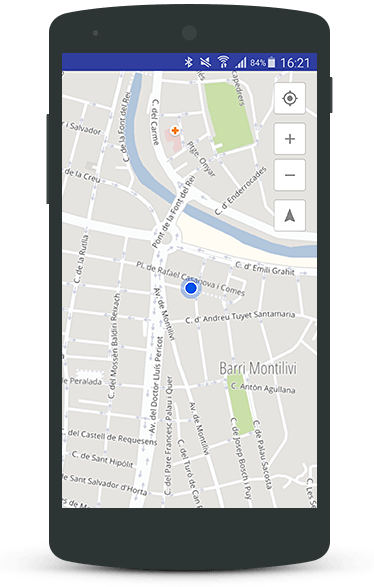
Embed Maps in Your App
Integrate interactive and customizable maps into your application with ease, offering users a rich and engaging experience.
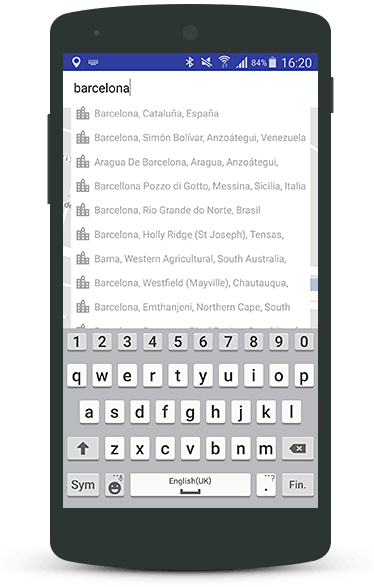
Geocoding
Enable real-time, autocompleted address suggestions to assist users in quickly finding desired locations.
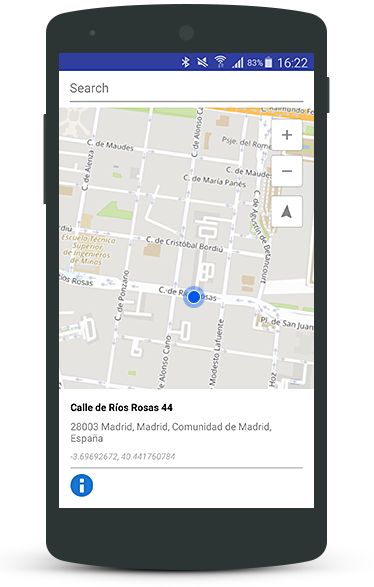
Reverse Geocoding
Retrieve the closest address corresponding to specific geographic coordinates, facilitating functionalities such as location-based searches and tagging.
Getting Started
To begin integrating the Cercalia Android SDK into your project:
- Request the SDK: Contact us to obtain the SDK package and your unique API key.
- Review the Documentation: Access detailed guides and references to understand the SDK’s capabilities and implementation steps.
- Integrate into Your Project: Follow the provided instructions to add the SDK to your Android application and configure it according to your needs.
For further assistance, refer to our comprehensive documentation or reach out to our support team.
Note: Ensure you have a valid API key to authenticate your requests and access Cercalia’s services.
3 - Cercalia iOS SDK
Comprehensive documentation for integrating Cercalia’s iOS SDK into your applications.
Welcome to the Cercalia iOS SDK documentation. Here, you’ll find all the necessary information to seamlessly integrate maps and location-based services into your iOS applications.
Overview
The Cercalia iOS SDK is a client API designed to empower your iOS applications with advanced mapping and geolocation capabilities. With this SDK, you can:
- Embed Interactive Maps: Effortlessly integrate dynamic maps into your app, enhancing user engagement and spatial awareness.
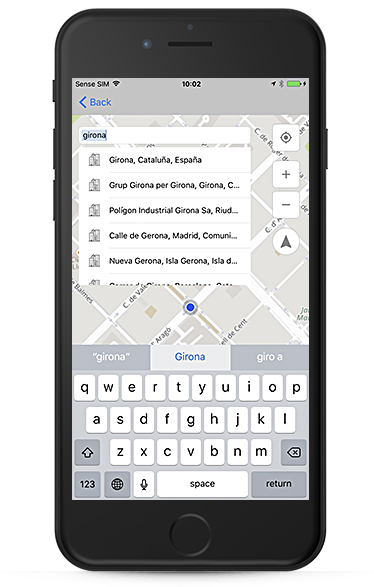
- Implement Geocoding: Provide users with autocompleted address suggestions as they type, streamlining the search experience.
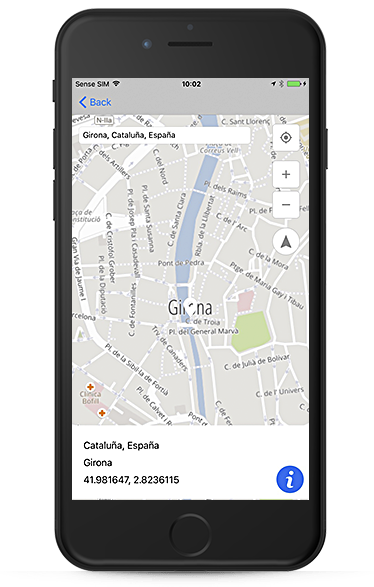
- Utilize Reverse Geocoding: Determine the nearest address based on geographic coordinates, enabling features like location tagging and address retrieval.
Features
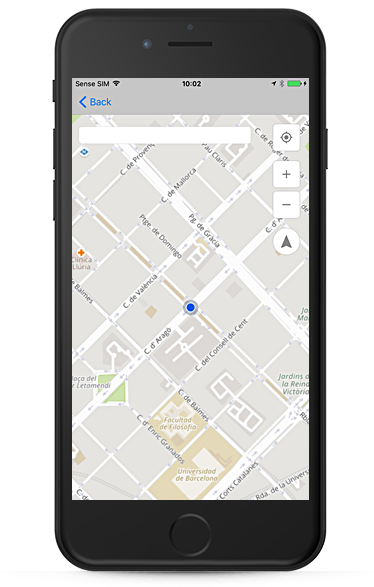
Include maps in your App
An easy way to integrate maps in any iOS Application.
Geocoding
Suggestions of autocompleted addresses for partial character string entries.
Reverse Geocoding
Find the nearest address based on a geographic location.
Getting Started
To begin integrating the Cercalia iOS SDK into your project:
- Request the SDK: Contact us to obtain the SDK package and your unique API key.
- Review the Documentation: Access detailed guides and references to understand the SDK’s capabilities and implementation steps.
- Integrate into Your Project: Follow the provided instructions to add the SDK to your iOS application and configure it according to your needs.
For further assistance, refer to our comprehensive iOS API documentation or reach out to our support team.
Note: Ensure you have a valid API key to authenticate your requests and access Cercalia’s services.